Version history

This section allows you to track what changes and additions have been made to the system. Using the filter, you can view changes for a specific period, in a particular area, in a specific build, or search for an item of interest using keywords.
2.1.5387.0
|
1.34.5

Monitor panels. Widgets

In the general properties of the Pie Chart widget within the monitor panel configuration interface, a Sort field has been added to sort widget values in Ascending or Descending order. To sort by Partition Parameter, the value Not Specified must be selected.
2.1.5369.0
|
1.34.3

Monitor panels. Widgets

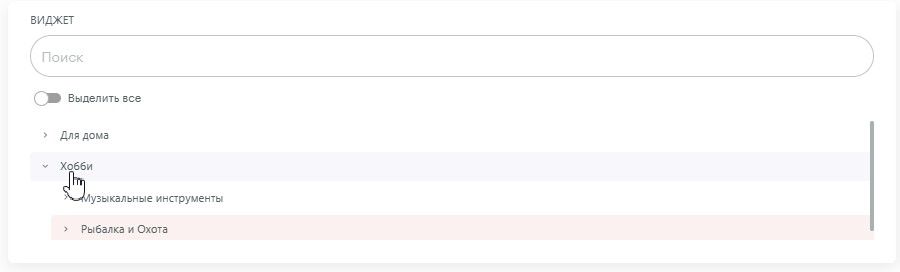
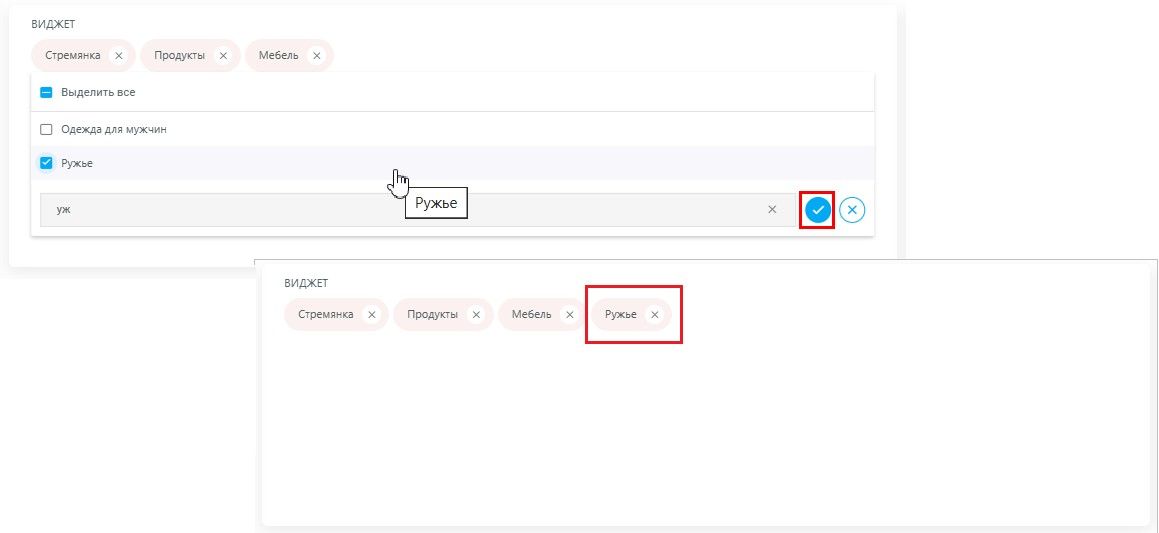
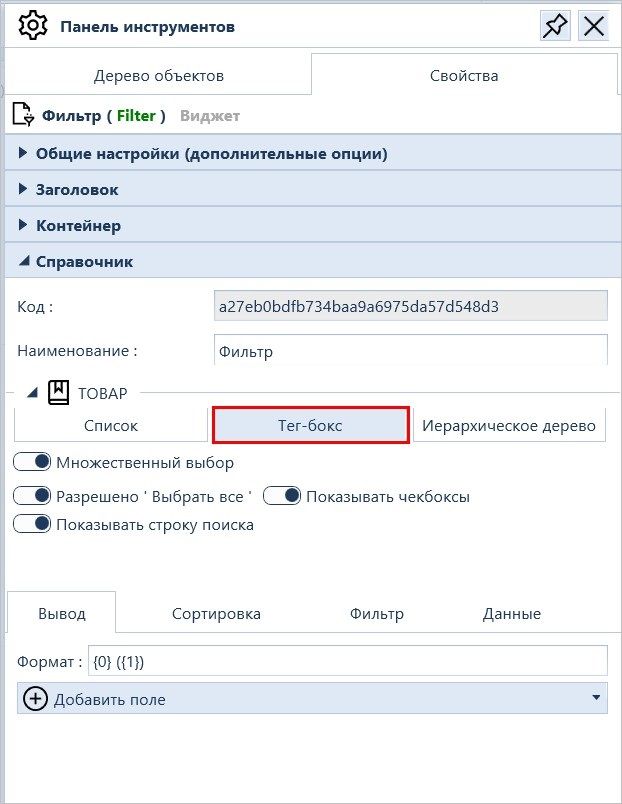
A new variant has been added for the Filter widget — Tag-box.

In the end-user interface, the value selection area expands with a mouse click in the Filter region. This allows users to intuitively select or deselect multiple filter values while maintaining a compact and organized layout.

Интерфейс настройки панели мониторов. Свойства виджета Фильтра вида Тег-бокс

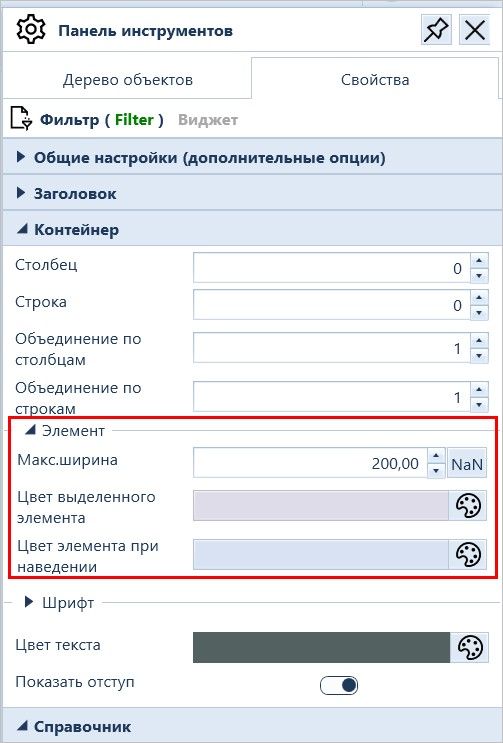
The properties of the Filter widget in the Container section have been expanded with the following fields:

  • Max Width (for setting the maximum width of the element selected in the Tag-box type filter)

  • Selected Item Color (customizes the color of selected filter items)

  • Hover Color (defines the color of filter items when hovered over)

Интерфейс конечного пользователя. Виджет Фильтр. Цвет выделенного элемента. Цвет элемента при наведении
Интерфейс настройки панели мониторов. Свойства виджета Фильтр. Раздел Контейнер
2.1.5364.0
|
1.34.1

Analytical objects. Catalogs

The properties of simple catalogs in the configuration interface have been expanded with the "Calculate element level" flag.

To add the corresponding field to the directory and automatically calculate the Hierarchy Level of its elements, you must run the Database Maintenance task\Restore broken hierarchical path

2.1.5364.0
|
1.34.1

Monitor panels. Widgets

The "Display data of level №" field has been hidden in the properties of new Chart widgets (in previously configured widgets, the field remains visible but is no longer functional).

Now, the desired hierarchy level (from the root of the directory) for report segmentation must be specified in the Filter Settings of the Partition Parameter.

2.1.5362.2
|
1.34.1

Monitor panels. Containers

A new Accordion container has been added to the system.

2.1.5358.0
|
1.33.15

Monitor panels. Widgets

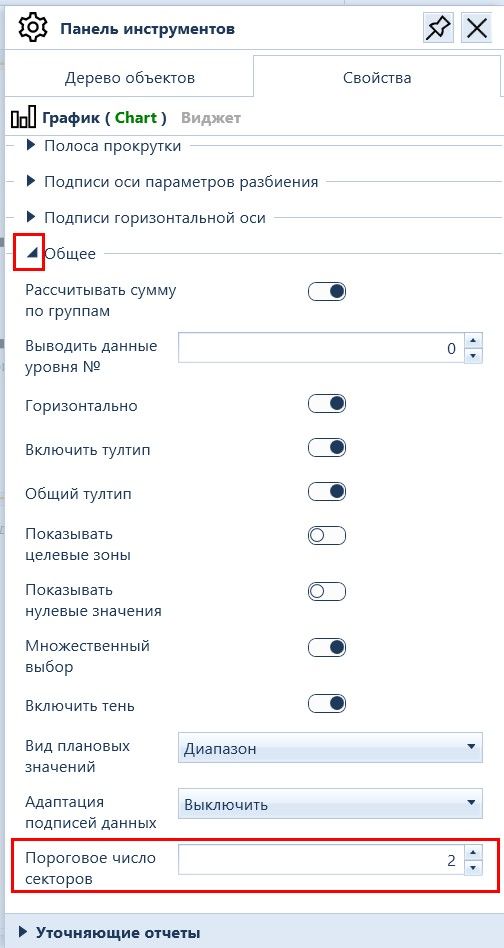
The Threshold Number of Sectors flag in the general properties of the Chart widget in the Monitoring Panel configuration interface has been renamed to Partition Item Limit.

  1. The label properties for actual values of the Chart widget in the Monitoring Panel configuration interface have been expanded with the Show unit of measurement flag.
  1. The general properties of the Polar Chart widget in the Monitoring Panel configuration interface have been expanded with the Multiple Selection flag (to allow selecting multiple segments in the widget, e.g., for use as a filter) and the Available reset of selected items flag (to allow clearing the selection of segments chosen by the user).
2.1.5357.0
|
1.33.15

Monitor panels. Widgets

The properties of the Chart widget in the Monitoring Panel configuration interface have been expanded:

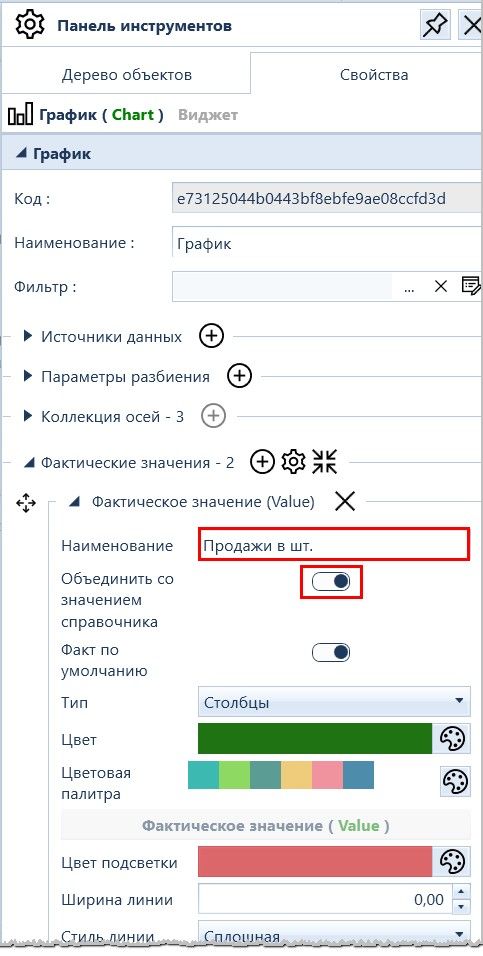
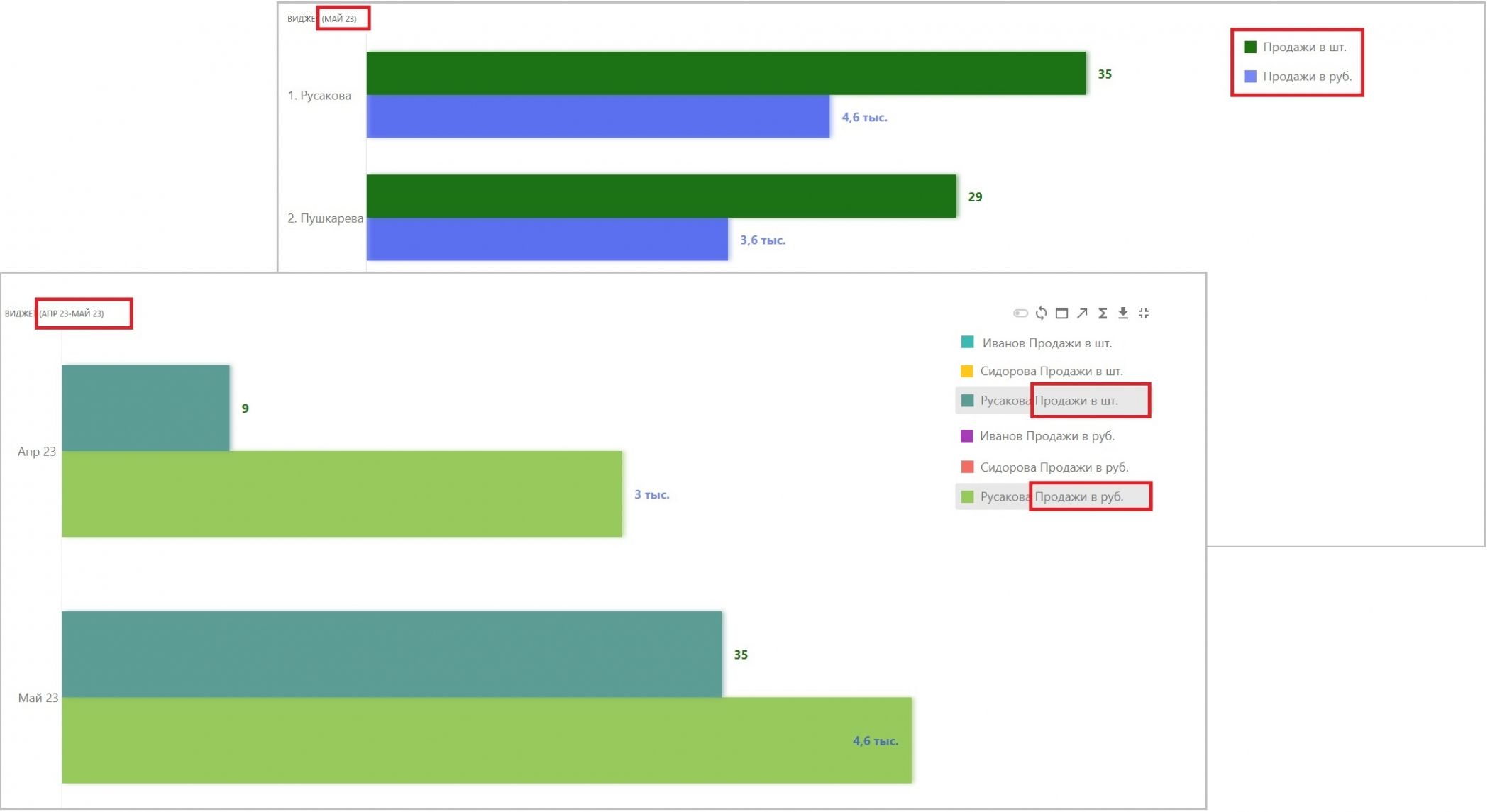
The Actual Values section has been added with the Merge with dictionary value flag to display the Field Name in the Legend (for example, when more than one fact is broken down by analytics).

Интерфейс настройки Панели мониторов. Свойства фактических значений виджета График. Флаг Объединить со значением справочника
Интерфейс конечного пользователя. Виджет График. Вывод названия аналитики и названия поля в Легенде
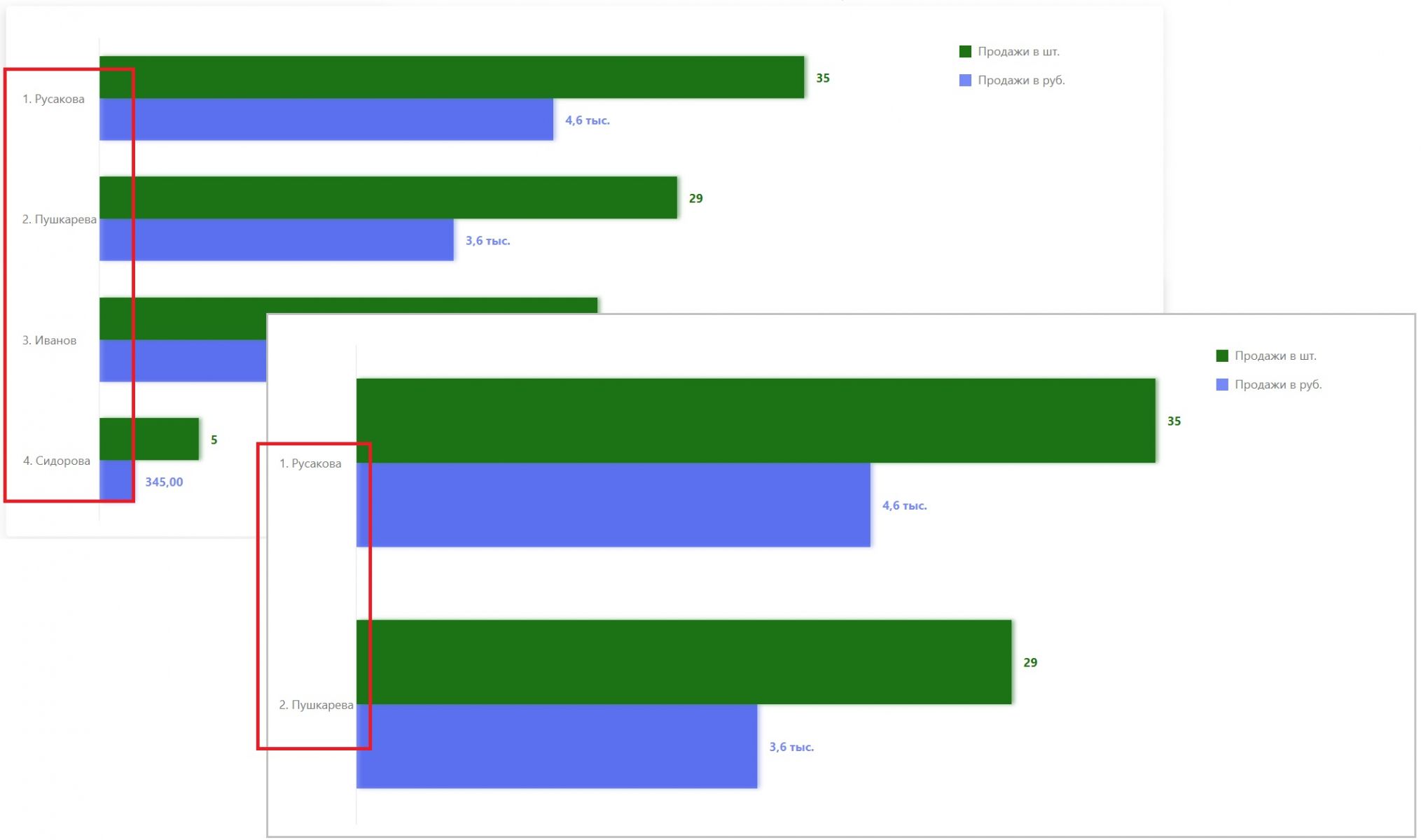
  • The General section has been added with the Partition Item Limit field to display a specified number of dictionary values on the breakdown parameter axis (the first N entries according to the specified sorting).
Интерфейс настройки Панели мониторов. Свойства виджета График. Общее. Поле Пороговое число секторов
Интерфейс конечного пользователя. Виджет График.Пороговое число секторов
2.1.5354.0
|
1.33.13

Monitor panels. Widgets

In the end-user interface for the Chart widget of type Column / Stacked Column, double-clicking on a column of the target analytics dimension now supports invoking drill-down actions.

The Drill-down Monitoring Panel invoked in this manner is built taking into account its Additional Settings (the Apply filter by item and/or Apply transitive filter flags).

2.1.5352.0
|
1.33.12

Monitor panels. Widgets

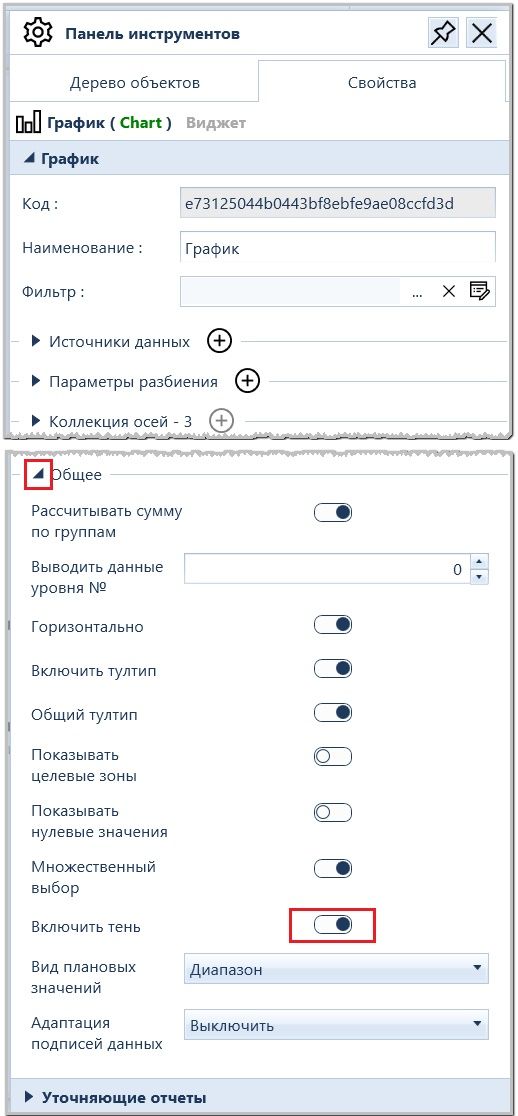
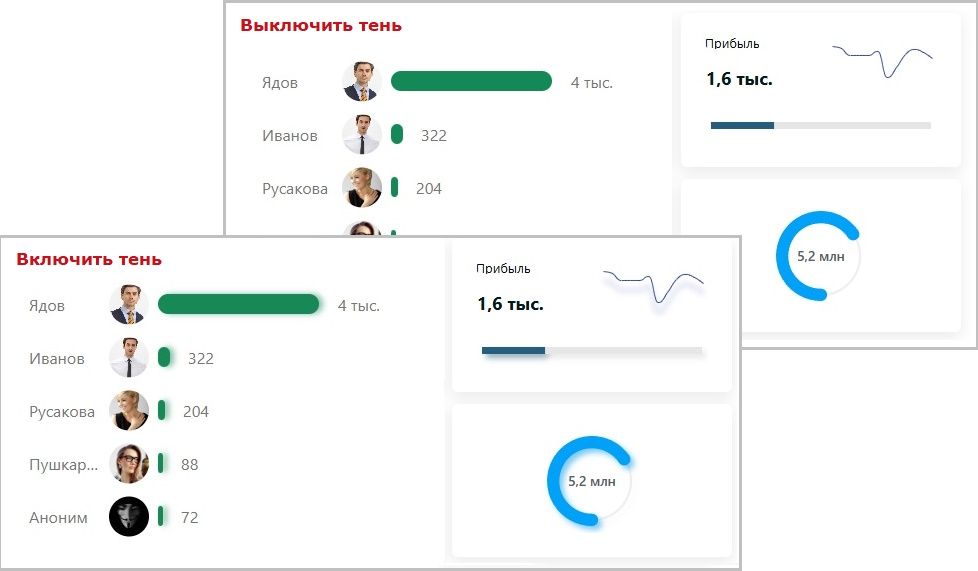
The general properties of widgets in the Monitoring Panel configuration interface have been expanded with the Enable shadow flag to allow enabling/disabling the shadow of the graphical display.

Интерфейс настройки панели мониторов. Общие свойства. Флаг Включить тень
Интерфейс конечного пользователя. Виджеты с тенью и без
2.1.5354.0
|
1.33.12

Monitor panels. Widgets

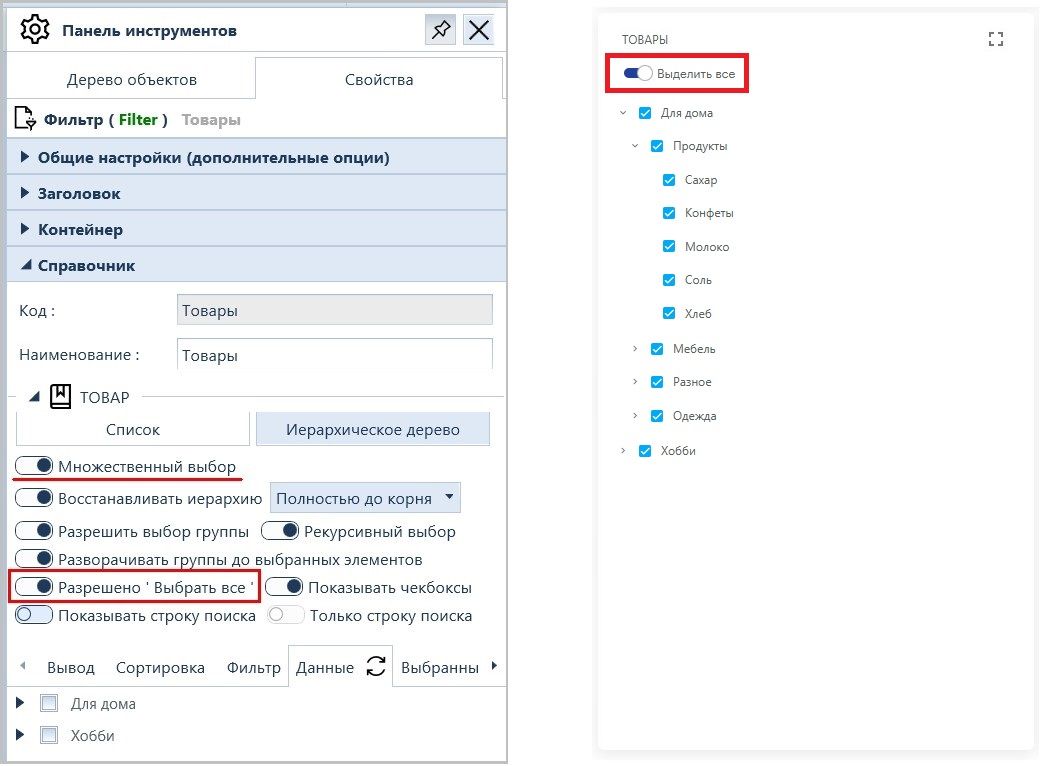
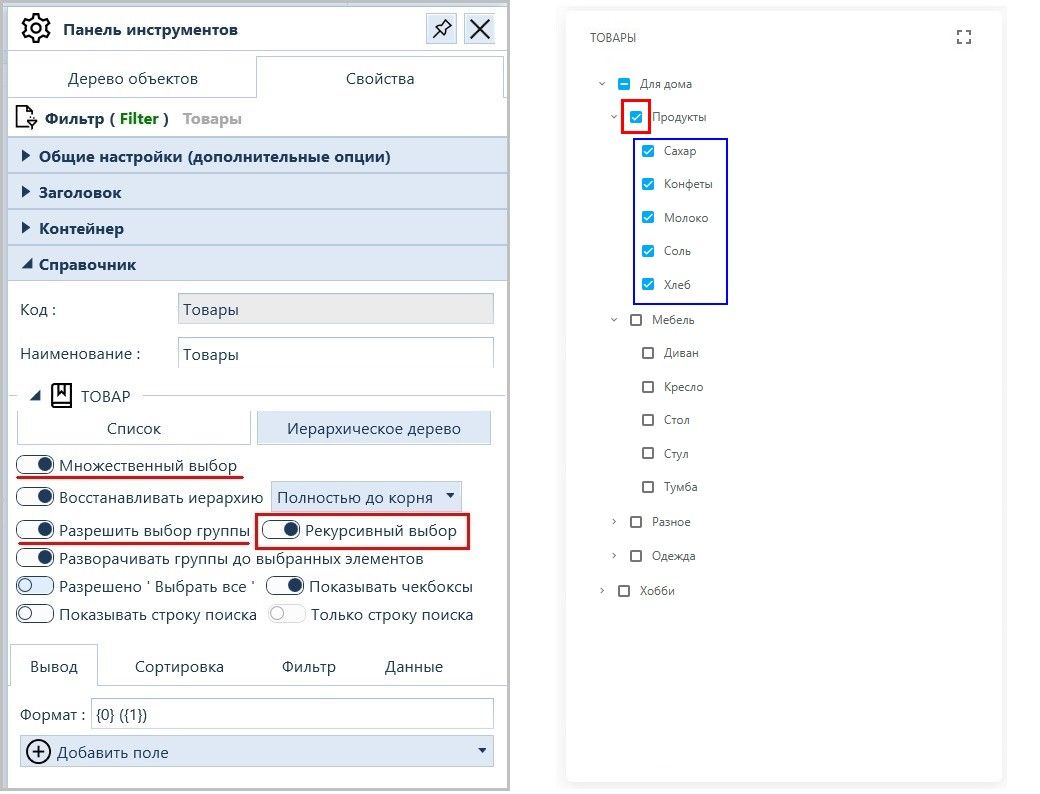
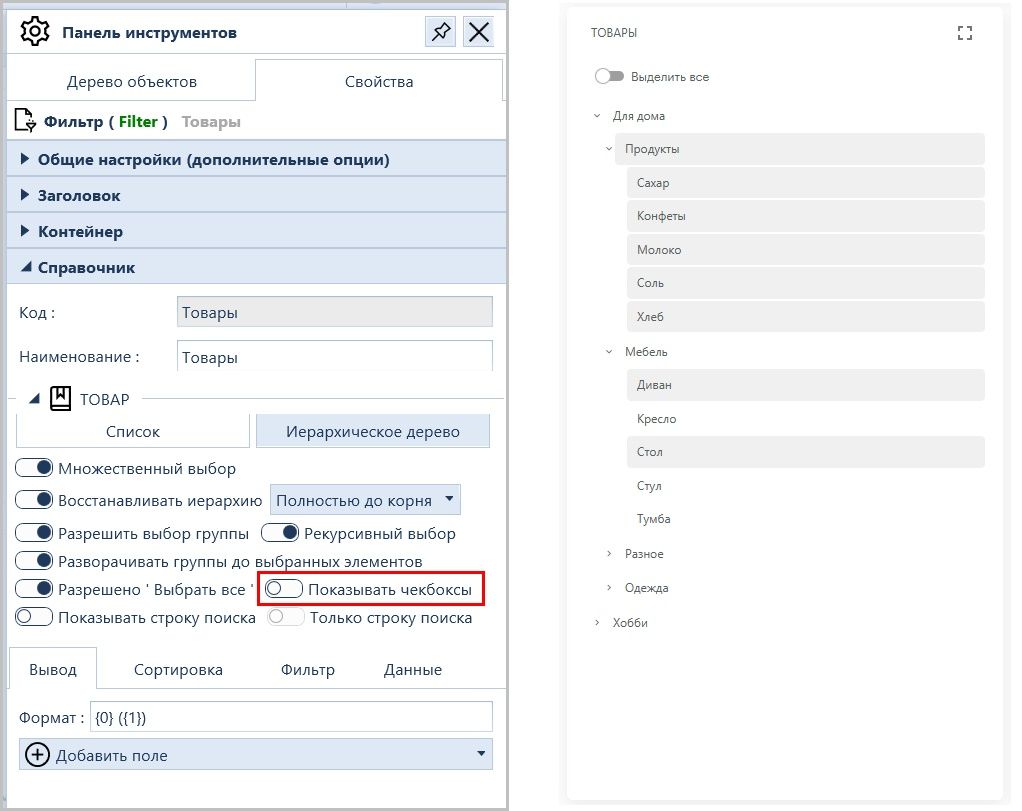
The properties of the Filter widget in the Monitoring Panel configuration interface have been expanded with the following flags:

Allowed 'Select All' - to show/hide the Select all button in Multiple Selection mode.

Свойства виджета Фильтр. Флаг Разрешено Выбрать все

Recursive Selection – to set/cancel the mode in which selecting a group also selects its items.

Свойства виджета Фильтр. Флаг Рекурсивный выбор

Display checkboxes – to show/hide the checkboxes.

Свойства виджета Фильтр. Флаг Показывать чекбоксы
2.1.5349.0
|
1.33.11

Monitor panels. Widgets

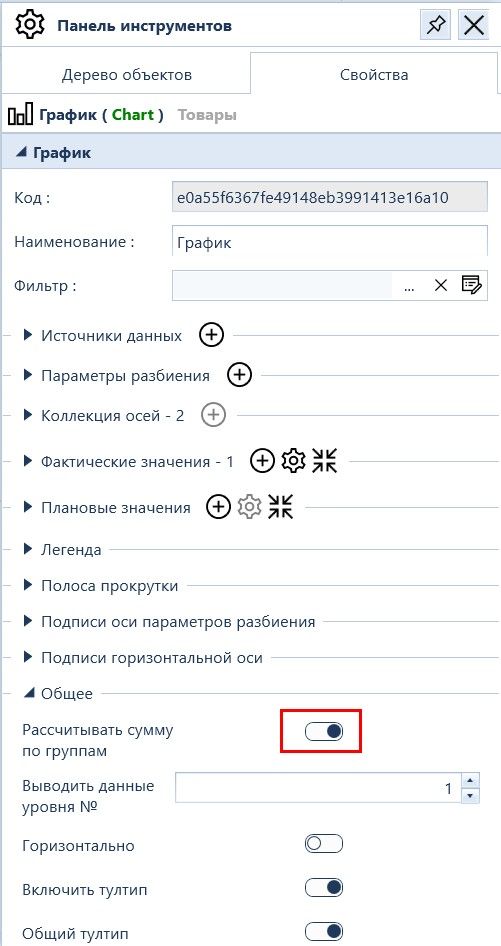
The general properties of the Chart, Sunburst, and Polar Chart widgets in the Monitoring Panel configuration interface have been expanded with the Calculate sum by groups flag. This flag controls whether the value of a hierarchical dictionary element is calculated as the sum of the element itself including its nested items.

If the flag is not set, the value of the group element is calculated excluding nested items.

Интерфейс настройки Панели мониторов. Свойства виджета График. Флаг Рассчитывать сумму по группам
2.1.5347.0
|
1.33.9

Monitor panels. Widgets

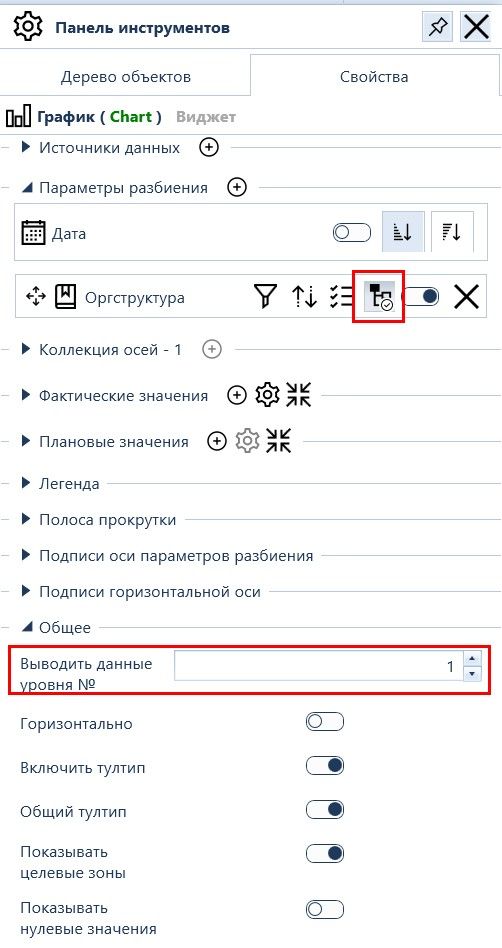
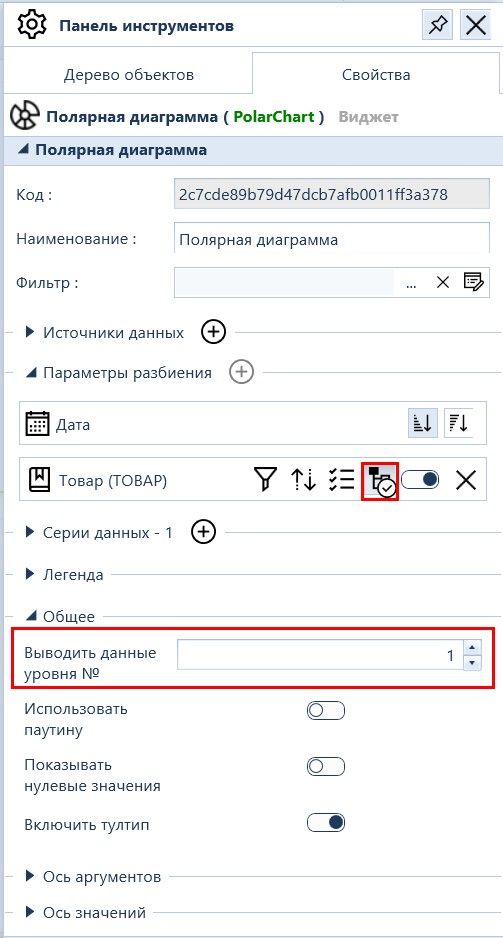
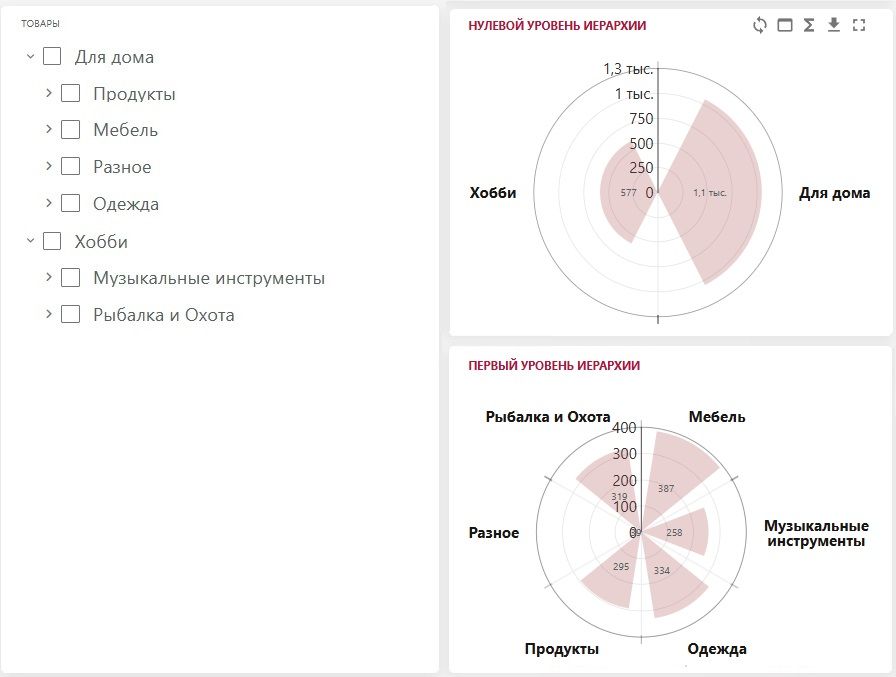
  1. The properties of the Chart and Polar Chart widgets in the Monitoring Panel configuration interface have been expanded:
  • The Breakdown Parameters section for Dictionaries now includes the Build by dictionary hierarchy flag.

  • The General section now includes the Display data of level No. field.

This setting allows selecting the hierarchy level (counting from the root of the dictionary) by which the report will be broken down. This setting is ignored if multiple dictionaries are used.

Интерфейсе настройки Панели мониторов. Свойства виджета График. Настройка вывода уровня иерархического справочника
Интерфейсе настройки Панели мониторов. Свойства виджета Полярная диаграмма. Настройка вывода данных указанного уровня иерархического справочника
Свойства виджета Полярная диаграмма в интерфейсе настройки Панели мониторов расширены:  Интерфейсе конечного пользователя. Полярная диаграмма. Вывод данных указанного уровня иерархического справочника Товары
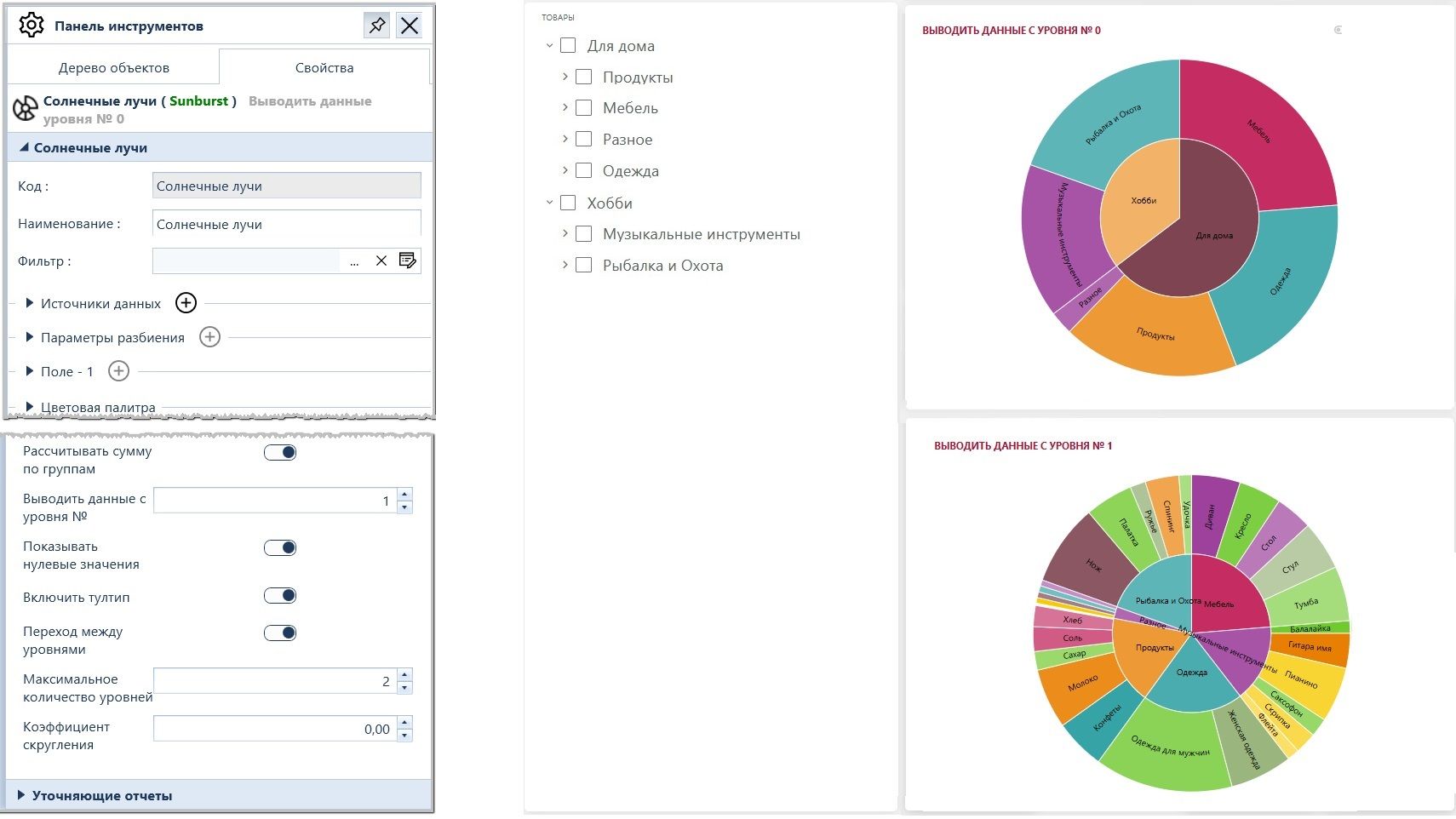
  1. The properties of the Sunburst widget in the Monitoring Panel configuration interface have been expanded with the Display data starting from level No. field. This allows selecting the hierarchy level of the Breakdown Dictionary from which the report will be built.
Свойства виджетов Солнечные лучи. Вывод данных с указанного уровня иерархического справочника Товары
2.1.5034.0
|
1.1.1

Monitor panels

  1. The general settings of the Monitor Panel in the configuration interface have been divided into two tabs:
  • Period Settings
  • Appearance
  1. The elements of the monitor panel are categorized by type into the following groups:
  • Containers (Table, Tabs, Dock Panel)
  • Visual Objects (Header, Image, Button, Hyperlink, Text, Input Field, Session User)
  • Reports (Metric, Tabular Report, Internal Report, KPI Map)
  • Widgets (Filters)
  1. The dependency settings for interconnected elements of the monitor panel have been moved to a separate section.
  1. Common properties for all Monitor Panel Elements are now grouped into the following sections:
  • Period Settings (for widgets) \ Report (for reports)
  • Header
  • Container
  1. Personal properties of the Monitor Panel Element are allocated to a section corresponding to its type.